
After you send a document, InProQu shows you what happens on the link.
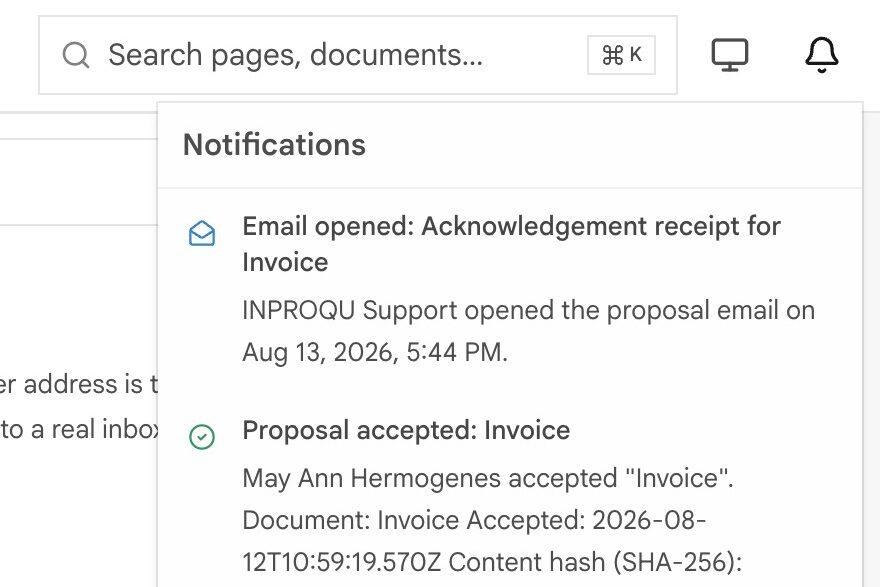
Alerts lists viewed, unopened reminders, signed, and similar events. Unread items show a blue dot. The tab badge is the unread count.
What counts as a view
A real person opening the public share link (not logged in as your teammate).
These do not count:
- Builder Preview
- Documents ⋯ → Preview
- You or a workspace member opening
/p/…while logged in - Platform admin QA
- Internal PDF / print fetches
- Mailbox scanners, link prefetchers, and known bots
Repeat views from the same visitor are collapsed for a while (about 30 minutes) so one session is not a dozen alerts.
Unopened vs viewed
| Alert | Meaning |
|---|---|
| Reminder: unopened | Shared past your Unopened reminder (days) and still no counted view |
| Proposal viewed | A counted client open |
| Follow-up | Viewed, still no accept / decline, past follow-up interval |
| Balance due | Money still outstanding |
If both “viewed” and “unopened” ever appeared at the same clock time, that was a scanner fetching a public link inside a staff reminder. Current outreach mail links the builder only.
Timing
[Notifications-settings] Set days under Settings → Documents / Notifications:
| Setting | Typical default | Meaning |
|---|---|---|
| Unopened reminder (days) | 2 (fallback 3 if unset) | When “Needs attention” and unopened outreach fire |
| Follow-up interval (days) | 7 | Viewed-but-quiet outreach |
A document can receive a small number of reminders, then stop. Mute alerts on Share silences that document.
[Share-mute-alerts] Mute is per document. Workspace defaults stay for everything else.
Who gets the email
Outreach emails are internal and go to you, not the client. This keeps InProQu from sending an automatic client reminder at the wrong time.
To email the client, send follow-up from Share (Client follow-up template). Thank youcan go to the client after accept if you have their email.
Slack, Telegram, Teams, SMS
In-app Alerts always work. Connect messaging if you want the same share / view / accept events in a channel or as SMS. Settings → Notifications sets which alerts go to each channel. Mute on Share still silences that document everywhere.
Outbound webhooks (Team+) can POST the same events to Zapier, Make, or n8n. That is not the same as Incoming Webhooks (which create clients).
Needs attention
The dashboard tile uses the same unopened window. It is not a Documents hub filter. See Your dashboard.