
Workspace Admin / Editor is not the same as who can change a given document. Edit access is per document.
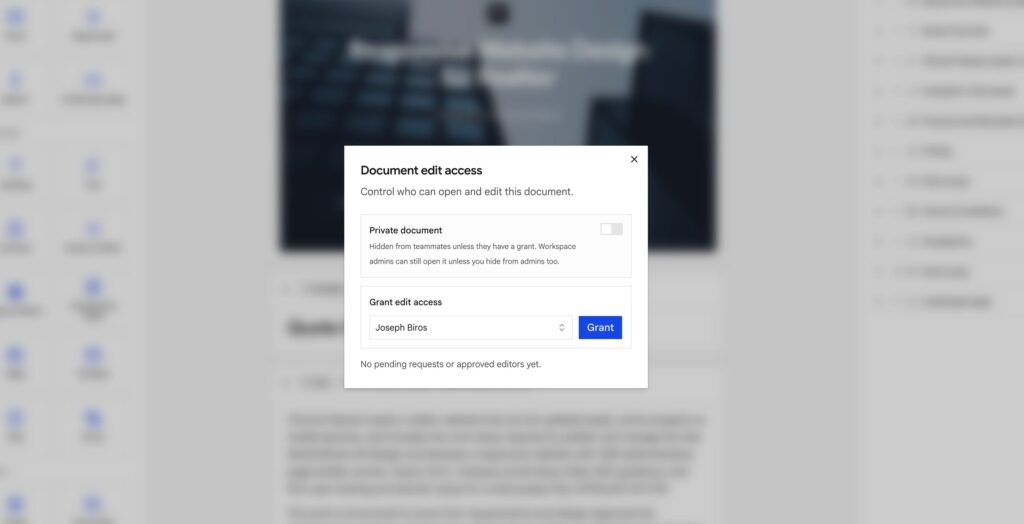
Open the lock on the builder toolbar: Document edit access.
Who can do what
| Person | Open the doc | Edit | Manage grants |
|---|---|---|---|
| Creator | Always | Always | Always |
| Workspace admin | Yes, unless the doc is private and hidden from admins | Same | Same as view |
| Editor (member) | Yes if the doc is not private | Only with a grant | No |
| Granted teammate | Yes | Yes | No |
Client on /p/… | Public share rules only | Never | Never |
A teammate without a grant can still preview a non-private document. They cannot change blocks, Vars, export/print, or reorder Layers until the creator (or a visible admin) grants them.
Grant, request, revoke
The creator (or a visible admin) searches a teammate and taps Grant. No request needed.
Anyone else taps Request access (from the lock dialog, or from the “Private / Restricted document” screen if they opened a link they cannot see). The owner gets an Edit access notification in-app and email by default. Approve or deny from the same lock dialog (a badge shows pending requests).
Revoke removes a granted editor. They go back to view-only (or cannot open the doc if it is private).
Private document
Turn on Private document when teammates should not even see the job in Documents unless they have a grant.
Workspace admins can still open it so support and recovery still work.
Hide from admins too
Only after Private is on. Then only the creator and people they grant can open it. Use this for sensitive HR or legal drafts.
Admins who need to recover the file must be granted explicitly. If the creator leaves the workspace with this on and nobody else has a grant, the document is stuck grant a backup admin before they go.
This is not the client-link password. Share-page privacy: Signatures and privacy.
Someone else is editing
If a teammate with edit access already has the document open, you get view-only until they leave (or the lock goes idle for about a minute and a half). That stops two people overwriting the same blocks.
Documents list
Filter Access → Can edit to jobs you can change (you created them, you were granted, or you are an admin who is not hidden). Private docs you cannot open do not show in your list.
Bulk archive / unshare / delete only runs on documents you can edit.
Phone companion
Same rules. Light edits on the phone still need edit access. Layout work stays on desktop web.