
The dashboard gives you a quick view of what happened after you sent a document. Use the Documents page when you need the full list.
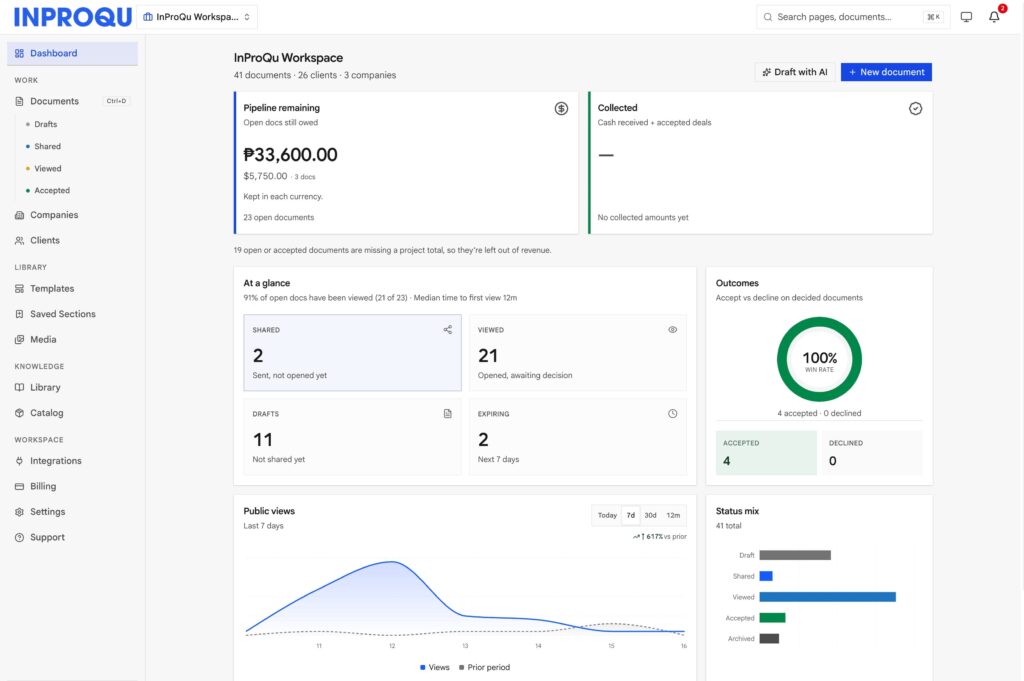
Pipeline, approved, Needs attention, and (while you are new) Getting started live here. The Documents hub is still where you search and bulk-edit jobs.
Pipeline vs approved
- Pipeline counts shared or viewed proposals and quotations.
- Approved counts after the client accepts.
- Invoices and acknowledgements are not counted again. Convert does not inflate the same deal as a second pipeline item.
Needs attention
Needs attention is a dashboard tile, not a filter on the Documents hub.
It means a shared document is still unopened past your workspace Unopened reminder (days) (typically 2 days; fallback 3 if unset), plus approaching deadlines. It does not mean the document content is stale or outdated.
From the tile, View shared takes you to Documents filtered to status Shared.
What is not a client view
Opening Preview from the builder, or ⋯ → Preview on the Documents list, does notcount as the client opening the link. Staff who are logged in and open /p/… also do not inflate views.
Mailbox scanners that open a public link in staff reminder mail are ignored by the system. Outreach emails to you should use the builder link, not the public /p/ URL.
Alerts
The Alerts tab (and the red badge) lists events such as proposal viewed, reminder: unopened, and proposal signed. Unread items show a blue dot.
If you ever see Proposal viewed and Reminder: unopened for the same document at the same clock time, that used to happen when a reminder email included the public link and a mailbox scanner fetched it. Current outreach copy links the builder only.
Mute vs workspace reminders
Mute is per document (Share → Mute alerts). Workspace timing lives under Settings → Notifications / document reminder days. Outreach emails go to you, not to the client. To nudge the client, send follow-up from Share.
Command palette
[Command-k] ⌘K / Ctrl+K searches pages, documents, clients, companies, templates, and sections when you cannot remember the title.